800 crew, five stages, four days. One plan.
Application form, a shift plan across every stage and day, QR check-in even without signal and the export for your payroll office – in one system, with an AI that checks along at every step. Unlimited crew, billed per shift.
Your own test environment in minutes. No credit card, ends automatically.

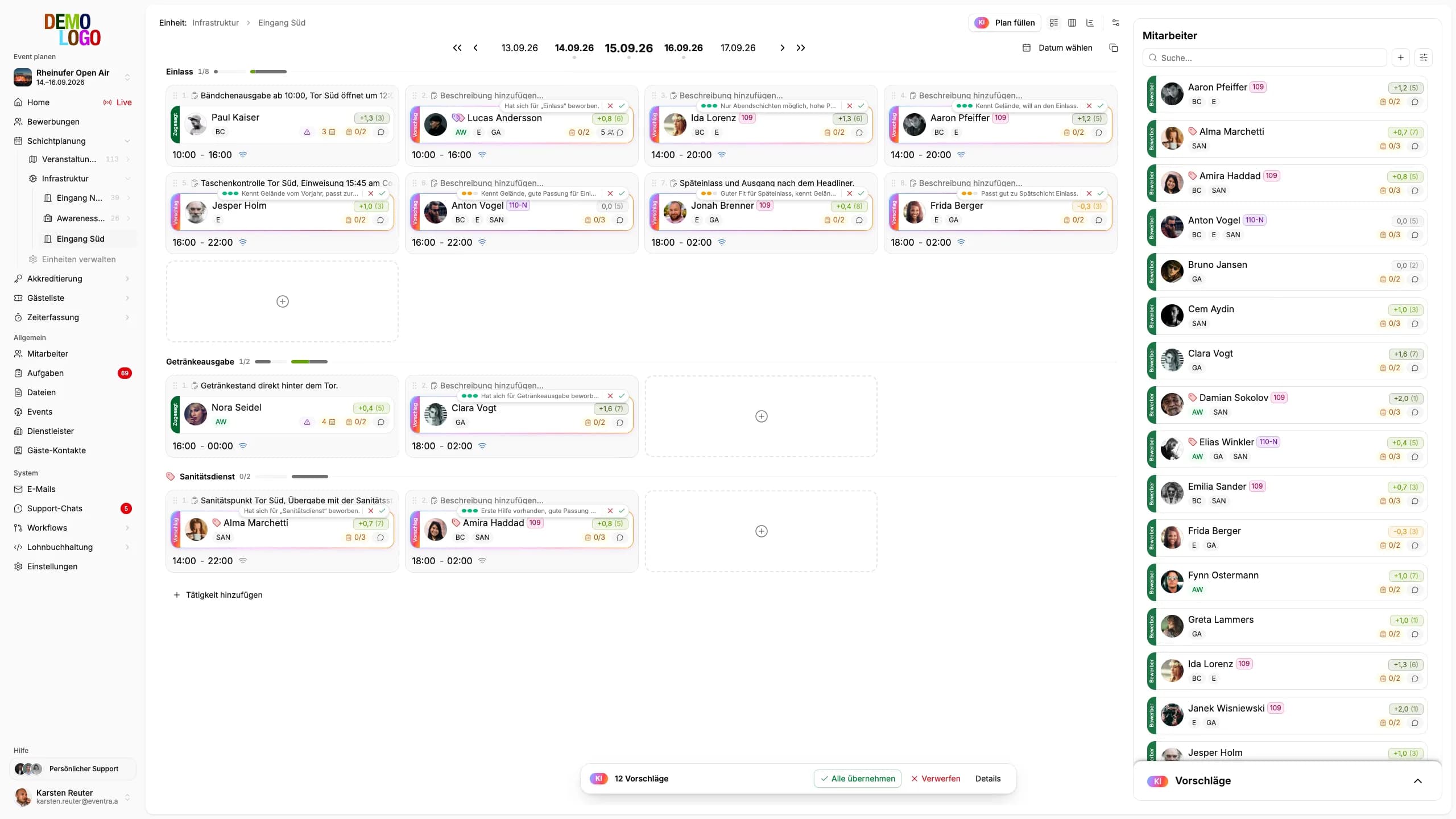




One system from crew call to payroll
Excel, WhatsApp, a Google form and a paper list are four tools for one job. EVENTRA is one, and the crew fills it in themselves.
Plan across stages and days
Every stage, gate and bar as its own area, every festival day as a column. Copy shifts from Friday to Saturday by drag and drop, the plan warns before a rest period or a Minijob limit breaks, and for every open shift the AI proposes who takes it.
- Areas and days in one grid
- Rest-period warning while dragging
- AI proposal for open shifts
A form that asks your questions
One freely configurable application form per festival: areas, qualifications, camping, arrival, uploads. The crew fills it in the app, AI checks every application for missing and implausible data and follows up. You review, tag and schedule.
- 100% configurable form
- AI checks completeness and plausibility
- Duplicates flagged by AI
Check-in at the gate, even offline
Team leads scan the crew by QR code at the area, even without signal on site. Times land in the system to the minute as soon as the device is back online.
- QR check-in at the area
- Offline with later sync
- Live board for operations
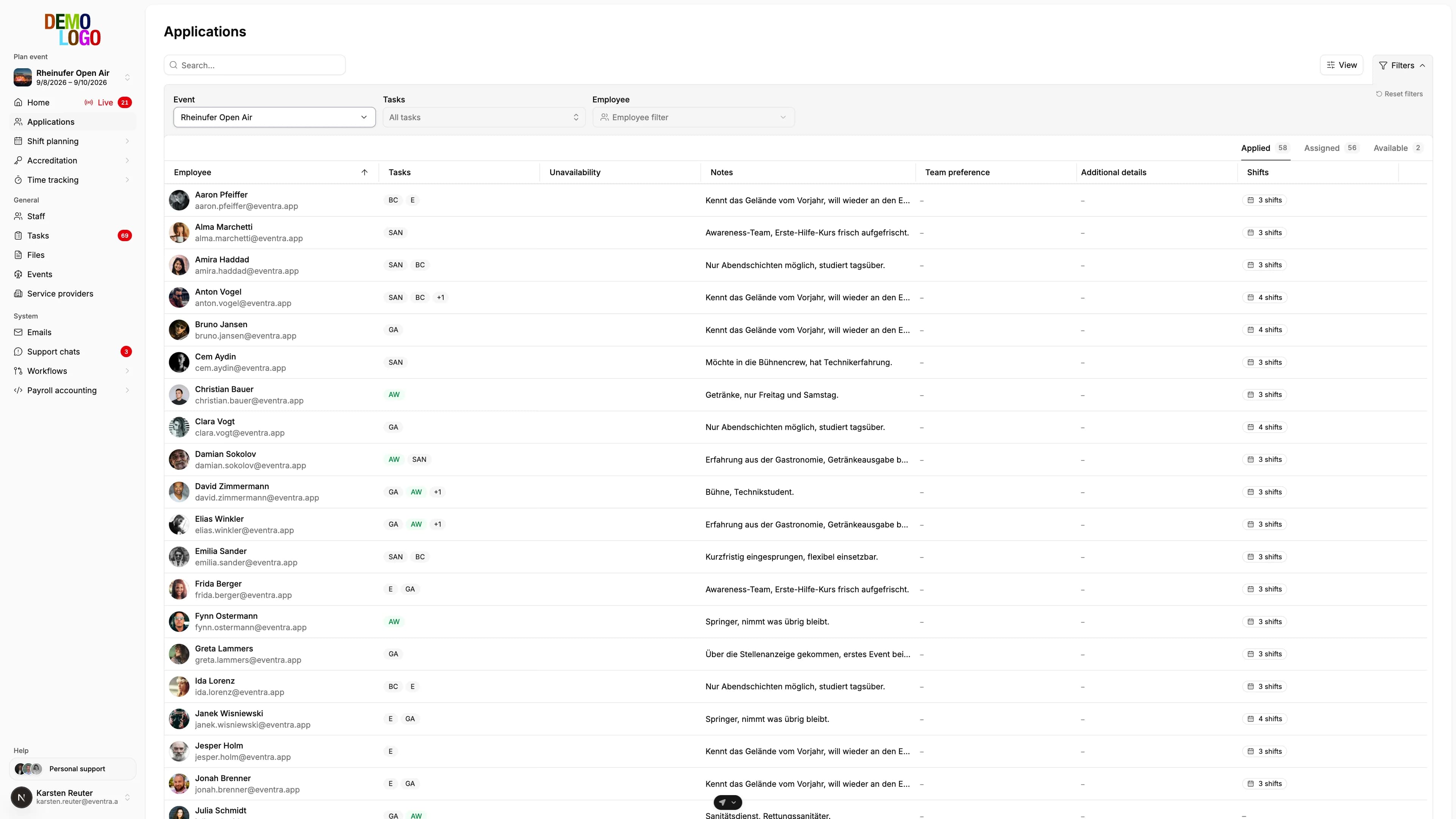
From crew call to a checked personnel file
You build the form with your fields and publish the link in the crew call. Applicants answer exactly your questions; AI checks whether everything is there and consistent and asks for what is missing. You see the finding and approve.
- Form configurable per event
- AI checks every application for completeness
- Qualification tags for bar, security and tech
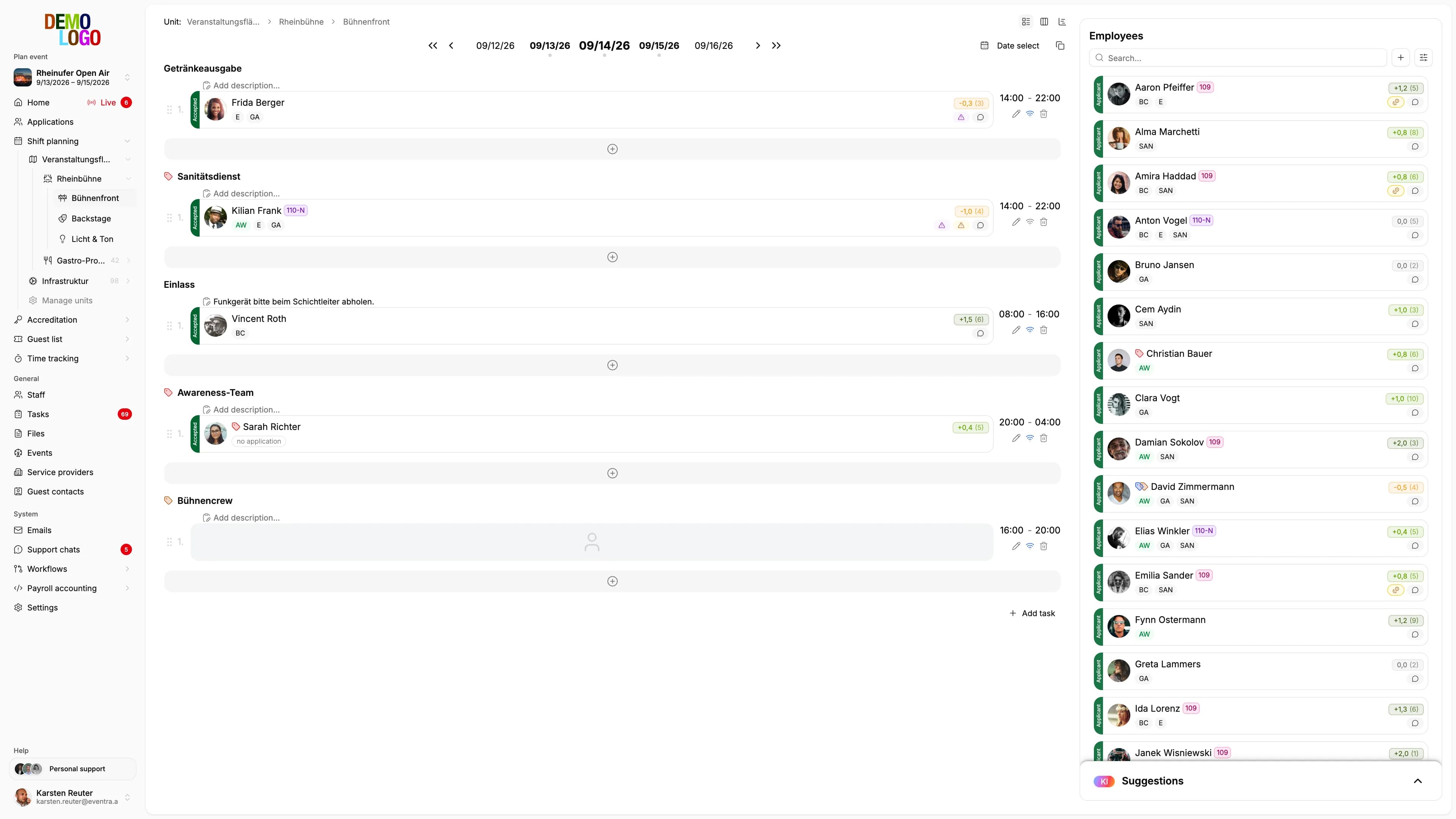
Every area, every day, one grid
Stages, bars, gates and backstage as areas, Thursday to Sunday as days. Drag, copy and fill shifts, with a warning at eleven hours of rest and at the Minijob limit before the shift is set. If a shift stays open, the AI proposes candidates, with a reason.
- Copy shifts by drag and drop
- Rest-period and Minijob warnings in the plan
- AI proposal for open shifts; only you book it
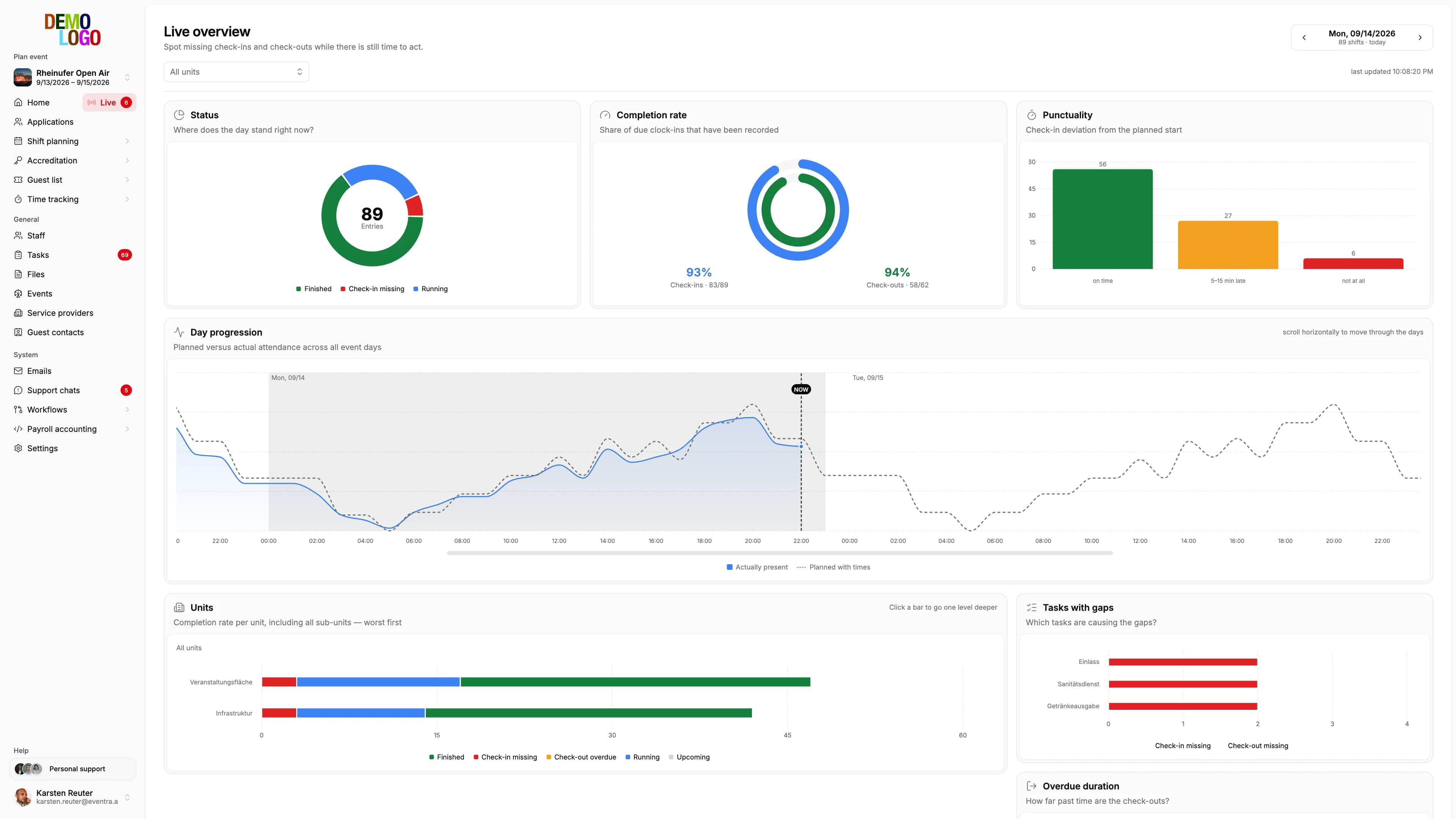
Who is here, who is missing, where it burns
The live board shows per area who has checked in and who is still missing for the next shift. Team leads see their area in the app, operations see the whole site.
- Check-in status per area in real time
- Missing crew visible before the shift starts
- Team-lead view in the crew app
Payroll your payroll office imports
After the festival you close the times per month. The AI reads the closure and names findings with evidence, EVENTRA counts the 70 days of short-term employment across all your events, and the file goes to your payroll office as DATEV LODAS, Lohn und Gehalt or StoTax.
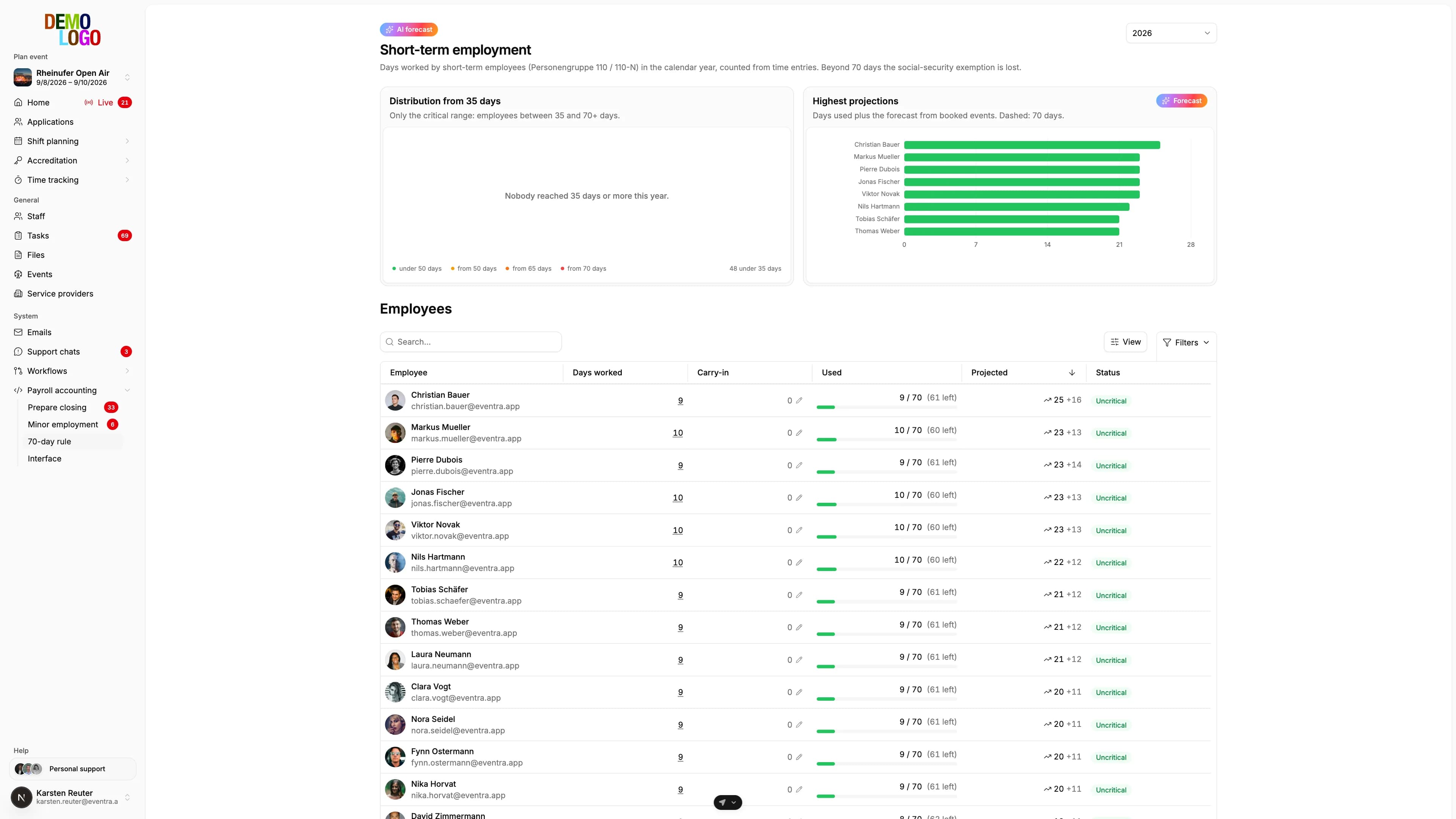
Monthly closure
Review times, read AI findings, approve
70-day rule
Counted across all events, with a forecast
Minijob limit
Per person and month at a glance
DATEV and StoTax
LODAS, Lohn und Gehalt, StoTax, by file or API



Festivals that run on it
What organisers say after their first season with EVENTRA.
„The crew management features have revolutionized our festival organization. We can now coordinate thousands of helpers efficiently and have a clear view of all areas – even at multi-day major events.“
 Bastian SchleichOrganizer, Ikarus Open Air Festival
„Digital shift planning and real-time tracking have significantly increased our crew satisfaction. Our team loves the app and communication is so much easier.“
Frequently asked questions
Short answers so you know what you will see in the demo.
Which software suits staff planning for a festival with several hundred helpers?
How do I plan shifts across several stages and festival days without violating rest periods?
Does check-in work on the festival site without mobile coverage?
What does EVENTRA cost for a festival?
Read next
Practitioner answers to the questions that come up next.
Festival staff planning in Excel: template, structure, and where it breaks
How to build a festival shift plan in Excel, which columns you actually need, which formulas check rest periods (Ruhezeit) and the 70-day limit, and above…
ReadSeason planning 2027: crew, budget and tools decided by January
Why staffing for the 2027 season is decided between October and January, which figures change at the turn of the year, how to derive the crew requirement…
ReadRest periods at events: the 11 hours, the exceptions, and the 4 am strike
The Working Hours Act (Arbeitszeitgesetz) requires 11 hours of rest (Ruhezeit) between two shifts.
ReadWorkforce Planning for Events: How to Master Staffing Challenges in the Event Industry
Workforce planning for event management: how many staff with which skills you need and when, quantitative and qualitative planning, step by step.
Read
See your festival in EVENTRA
30 minutes with the founder. Bring your stages, days and crew count and we rebuild the plan live.
Your own test environment in minutes. No credit card, ends automatically.
See pricing